ECTLogger
A Modern Radio Net Logger

Whether you’re running a casual weekly club net or coordinating a multi-agency emergency response, ECTLogger adapts to your needs. Start simple and grow into advanced features as your operations demand.
For community nets, keep things fun and engaging. Add a Topic of the Week to spark conversation, run polls to gather opinions, and let participants chat in real-time alongside the check-in log. The clean, modern interface makes logging effortless—no more wrestling with clunky desktop apps or decade-old web interfaces.
For SKYWARN and weather nets, capture what matters. Enable spotter number and weather observation fields to collect critical data from trained spotters. View check-in locations on an interactive map supporting entry of town and state, GPS coordinates, Maidenhead grid squares, UTM, and MGRS formats in the check-in’s Location field — perfect for situational awareness during severe weather events.
For ARES and emergency communications, ECTLogger handles the complexity. Multiple NCS operators can work different frequencies simultaneously, with check-ins intelligently separated by band but logged together in one unified view. When the incident wraps up, generate ICS-309 Communications Logs with a single click for your after-action reports.
The responsive interface works beautifully on any device — from a phone in the field to a multi-monitor EOC workstation. Pop out the check-in list or chat into detachable windows within the browser to customize your workspace. Dark mode keeps things easy on the eyes during those long operational periods.
🌐 Try it now at app.ectlogger.us — No installation required!
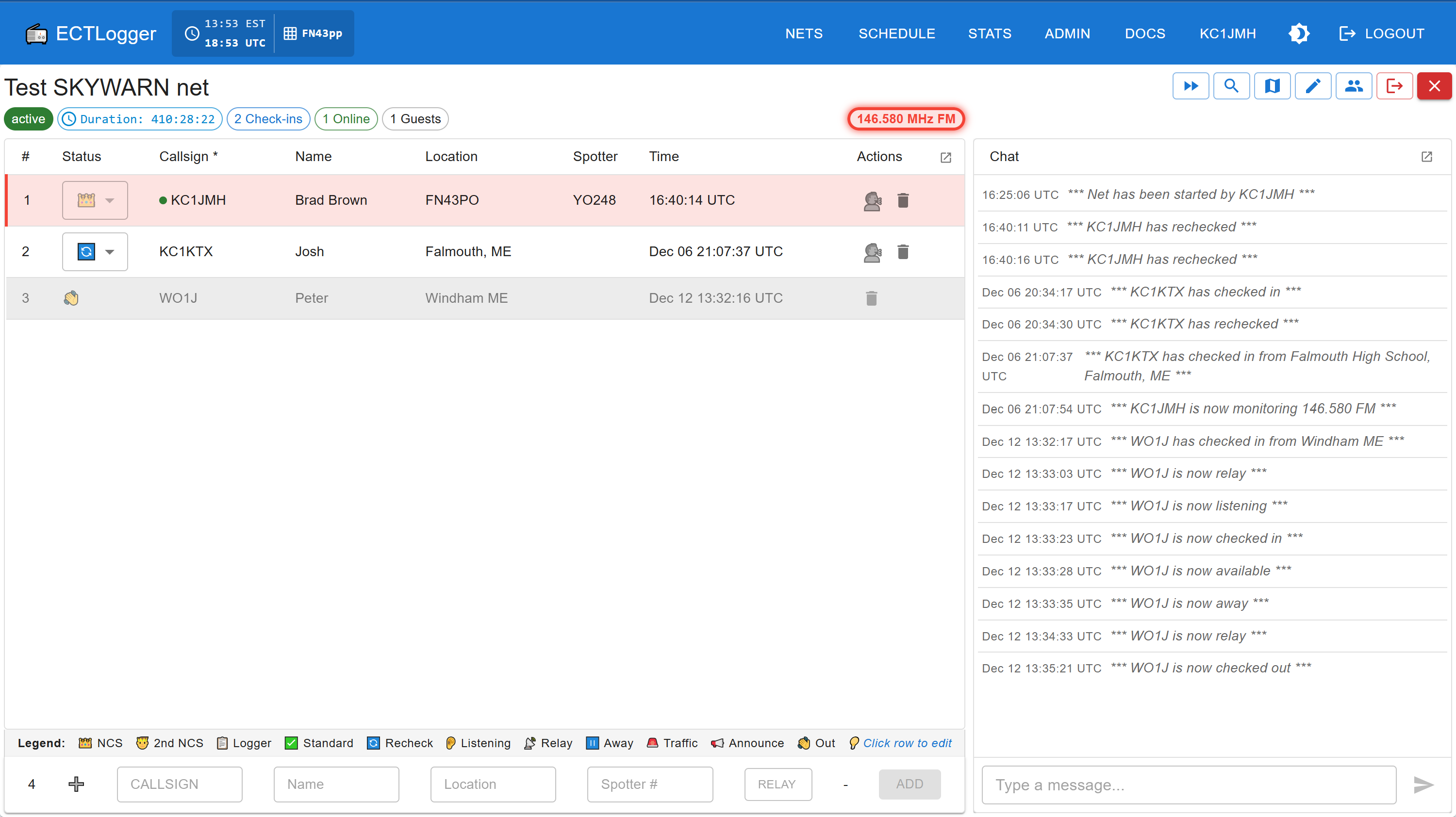
Multi-frequency/band check-ins, shown in dark and light mode! — 📷 More screenshots
✨ Features
Core Capabilities
- 🔐 Secure Authentication — Frictionless sign-in with magic link email authentication + OAuth (Google, Microsoft, GitHub)
- ⚡ Real-Time Updates — WebSocket-powered live check-ins, status updates, and chat messages
- 👥 Role-Based Access — Admin, NCS, Logger, User, and Guest roles
- 📧 Email Notifications — Automatic net reminders, start notifications, and invitations
- 📱 Mobile Responsive — Works seamlessly on phones, tablets, and desktops
- 📻 Multi-Frequency Support — Track stations across multiple frequencies and modes
- 👥 Multi-NCS Support - Multiple NCS operators can check in and track stations across multiple frequencies and modes simultaneously
Net Management
- 📅 Scheduling — Schedule recurring nets with automatic NCS rotation
- 📜 Net Scripts — Create formatted scripts for NCS operators to follow during nets
- ✏️ Inline Editing — NCS/Loggers can click any check-in row to edit fields directly
- 🦔 Speed Entry - Hit the ⏩ button to enter a string of check-ins in fast-moving nets
- 🔄 Recheck Tracking — Track stations as they check in and out, on different frequencies if needed
- 📊 Custom Fields — Admins can create custom fields for specific net requirements
- 📊 Poll Questions — Add poll questions to nets with real-time results chart
- 💬 Topic of the Week — Prompt participants to share on a topic during check-in and track their answers
- 🔍 Filter & Sort — Search and sort nets, schedules, frequencies, users, and fields
- 📋 Card/List Views — Toggle between card and list views on Dashboard and Scheduler
- 📝 Complete Net Logs — Automatic log generation and email delivery
Location & Mapping
- 🗺️ Station Mapping — View check-in locations on OpenStreetMap
- 🌐 Multiple Formats — Town & state, GPS, Maidenhead, UTM, MGRS coordinate support in Location check-in field
- 📍 Location Awareness — Auto-fill Maidenhead grid square from browser location, if enabled by the end user
Multi-Frequency Net Support
ECT and SKYWARN nets often move between frequencies to meet participants where they are. ECTLogger tracks:
- Multiple frequencies per net - Nets can support multiple active channels, frequencies, and modes
- Active frequency indication - Users can see which frequency each NCS is active on so that they may follow
- Per-station frequency tracking - Each station can check or re-check into more than one operating frequency
- Real-time frequency change notifications - Freqency changes are updated to all users in real-time
Analytics & Reporting
- 📧 Emailed net closure reports - Net participants can receive chat logs, check-in logs, topic answers, and poll results
- 📃 ICS-309 Communications Log - For ARES and ECT nets, ICS-309 documents can be downloaded and emailed from closed nets
- 📈 Statistics & Analytics — Track participation trends, operator activity, and net performance with interactive charts
- 📄 Net Report (PDF) — Generate comprehensive multi-page PDF reports for closed nets including statistics, check-in logs, chat, and ICS-309 sections
👥 User Roles
ECTLogger has two types of roles: global roles (system-wide) and net roles (per-net assignments).
Global Roles
ECTLogger provides the following types of users:
| Role | Description |
|---|---|
| 🛡️Admin | Full system access, user management, view all nets, configure custom fields |
| 👤User | Create nets, check into nets, receive notifications |
| 👁️Guest | View-only access to public nets (no account required) |
Net Roles
When a user creates a net, they automatically become its NCS (Net Control Station). The net creator can assign these roles to other users:
| Role | Description |
|---|---|
| 👑NCS | Full control: start/close net, manage check-ins, assign roles |
| 📋Logger | Log check-ins and manage station status |
| 📡Relay | Check in stations on behalf of others |
Any registered user can run their own nets!
Station Status Tracking
Visual indicators for station status:
- ✅ Checked In
- 👂 Just Listening
- 📻 Available
- ⏸️ Away
- 👋 Checked Out
- 🔄 Recheck (returning stations)
A legend at the base of the check-in list identifies each status icon.
📋 Net Workflow
1. Create Net
Define your net with name, description, frequencies, and required fields. Assign roles and save as draft.
2. Schedule (Optional)
Set date/time, configure recurring schedule, and set up NCS rotation with automatic reminders.
3. Start Net
NCS starts manually or net auto-starts if scheduled. Email notifications sent to subscribers.
4. Log Check-ins
NCS or logger enters check-ins with real-time updates to all connected clients.
5. Close Net
Complete log generated automatically and emailed to NCS. Net archived for reports.
📚 Documentation
Getting Started
| Document | Description |
|---|---|
| User Guide | How to use ECTLogger as a participant or NCS |
Self-Hosting
ECTLogger can be self-hosted on your own server. See the self-hosting documentation:
| Document | Description |
|---|---|
| Self-Hosting Guide | Overview of self-hosting options and requirements |
| Quick Start | Get up and running in 5 minutes |
| Manual Installation | Step-by-step installation for advanced users |
| Production Deployment | Deploy with SSL/HTTPS and reverse proxy |
Configuration
| Document | Description |
|---|---|
| Magic Link Configuration | Configure magic link expiration |
| Email Deliverability | Email setup and troubleshooting |
| Logging | Configure log levels and debug output |
Security
| Document | Description |
|---|---|
| Security | Security features and best practices |
| Fail2Ban | Automatic IP banning setup |
Development
| Document | Description |
|---|---|
| Development Guide | Architecture, API, and contributing |
📄 License
This project is licensed under the MIT License — see the LICENSE file for details.
You can: ✅ Use commercially · ✅ Modify · ✅ Distribute · ✅ Use privately
With the requirement to include copyright notice and attribution.
🙏 Acknowledgments
Built for the amateur radio and emergency communications community.
Special thanks to all NCS operators, loggers, and participants who make emergency communication nets possible.
📞 Support
- Issues: GitHub Issues
- Documentation: See links above
- Questions: Open a discussion on GitHub
73 and stay safe! 📻